
Exports
Buildary offers several options for exporting tickets and for choosing the output format. Exports are available in PDF or XLS format, and the content of the downloaded data can be customized.
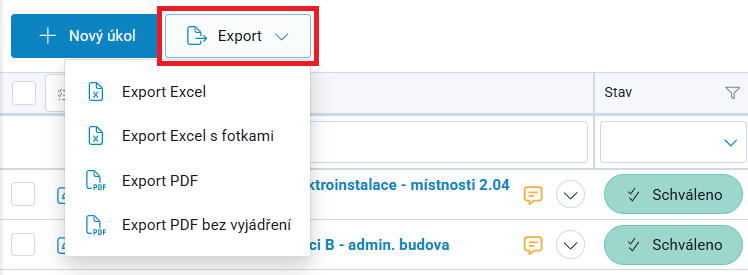
1/ To download all tickets currently displayed in the grid, use the Export button above the ticket grid. There are 4 export options:
- Export Excel ⇒ downloads an Excel workbook containing all tickets currently displayed in the grid, listed one below another, with a complete list of parameters in columns, regardless of which columns are selected in the grid.
- Export Excel with Photos ⇒ downloads a ZIP file containing the same Excel workbook as above, plus all images / photos attached to the relevant tickets (non-image attachments are not downloaded). !IMPORTANT! Images embedded in Statements are not included in this file.
- Export PDF ⇒ downloads a PDF file, with each ticket starting on a new page. All attachments associated with the tickets, whether added as attachments or included in Statements, are included as electronic attachments in the PDF file and can be accessed via the paperclip icon in the PDF editor being used (Adobe Acrobat / PDF-XChange Editor, etc.).
- Export PDF without Statements ⇒ downloads a PDF file, with each ticket starting on a new page, but the Statement thread is omitted, including its attachments.
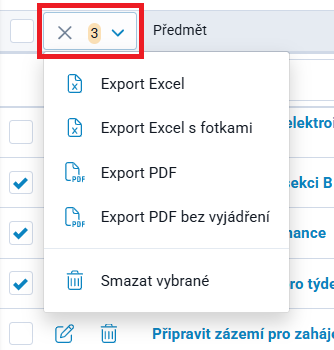
2/ To download only selected tickets displayed in the grid, you can select the required items by checking the checkbox at the beginning of each row and then use the Bulk Operations button for the selected items. Proceed in the same way as described in point 1/.
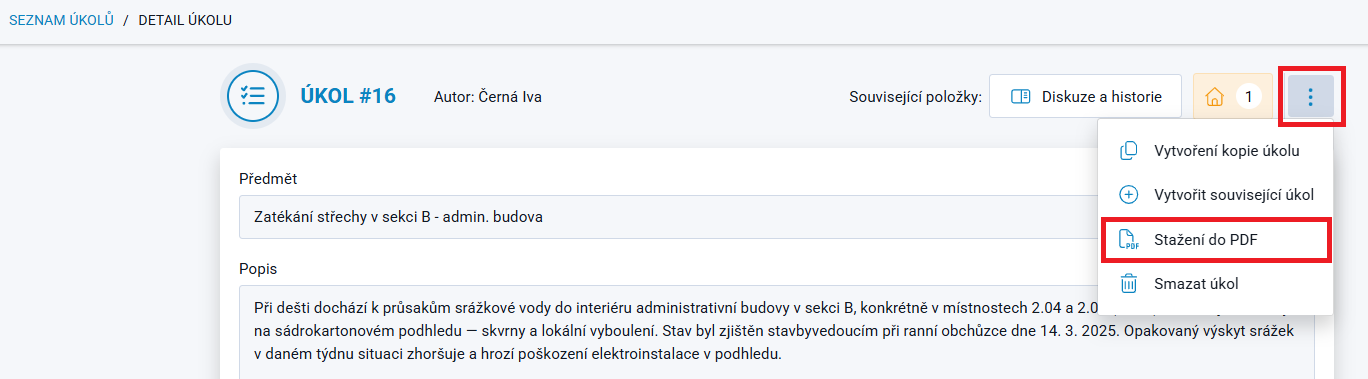
3/ A ticket can also be downloaded individually in PDF format, either directly from Ticket Details (Edit Ticket) or from the Kanban view. The option to download the ticket is located in the top-right corner under the vertical Three-Dot Menu.