Switching to Paid Mode
Your monthly trial period begins when you create your account. During this period, you can use the full range of Buildary functionality. At the end of this one-month trial period, the application will ask whether you want to switch to paid mode.

If you do not want to continue in paid mode, you do not need to do anything. Your use of Buildary will simply be limited to projects you have been invited to and that are therefore paid for by someone else. This does not mean that you can no longer work in Buildary, but you will not be able to work on your own projects. You can still change your decision later (within 3 months) and switch your domain to paid mode.
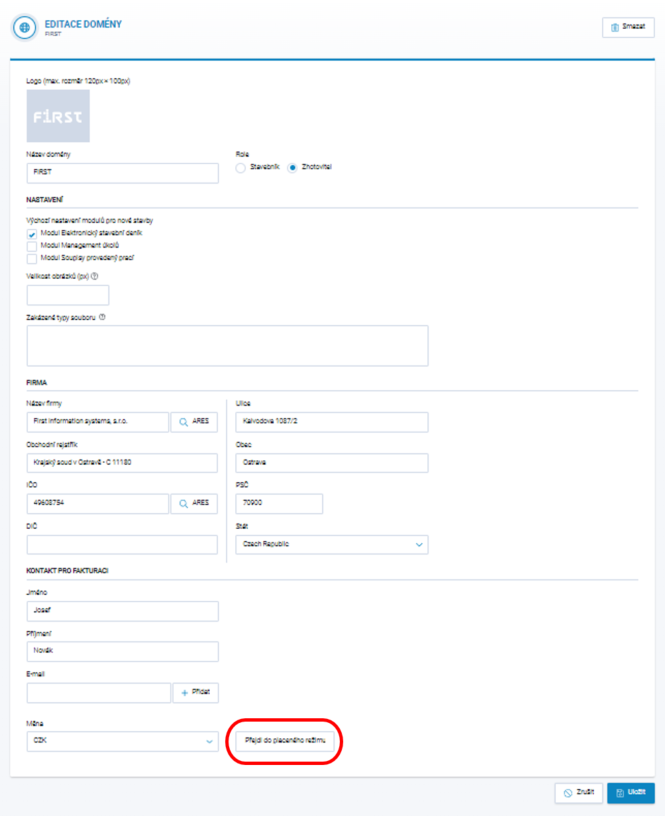
If you want to switch to paid mode, go to Domain Settings, enter your billing details, and click Switch to Paid Mode. Please note that you must Save the page using the button in the bottom-right corner. Billing takes place once every 3 months in arrears, always for a specific project, at a rate based on the number of users on the project. See http://www.buildary.online/cs/cena-cz or http://www.buildary.online/sk/cena
In addition to the standard mode described above, individual terms and conditions can be agreed upon. We will switch domains with an individual contract to individual mode. If you are interested in individual terms and conditions, contact us at buildary@firstis.eu.