Copying from Other Days of the Same Diary
Video: Copying Records from Other Days
The function for copying daily entries from previous days significantly reduces the amount of work required when working with the diary. You can copy all sections or only selected sections.
Copying Records from Other Days

Consecutive days on a project are often very similar in terms of the records entered into the diary. It is therefore useful to use the function that transfers data from previously created records, leaving you to deal only with the changes between individual days, which is often minimal work.
You can copy each section individually using the  , which appears when a section is expanded, or copy the contents of the entire day using the Other options menu for the day.
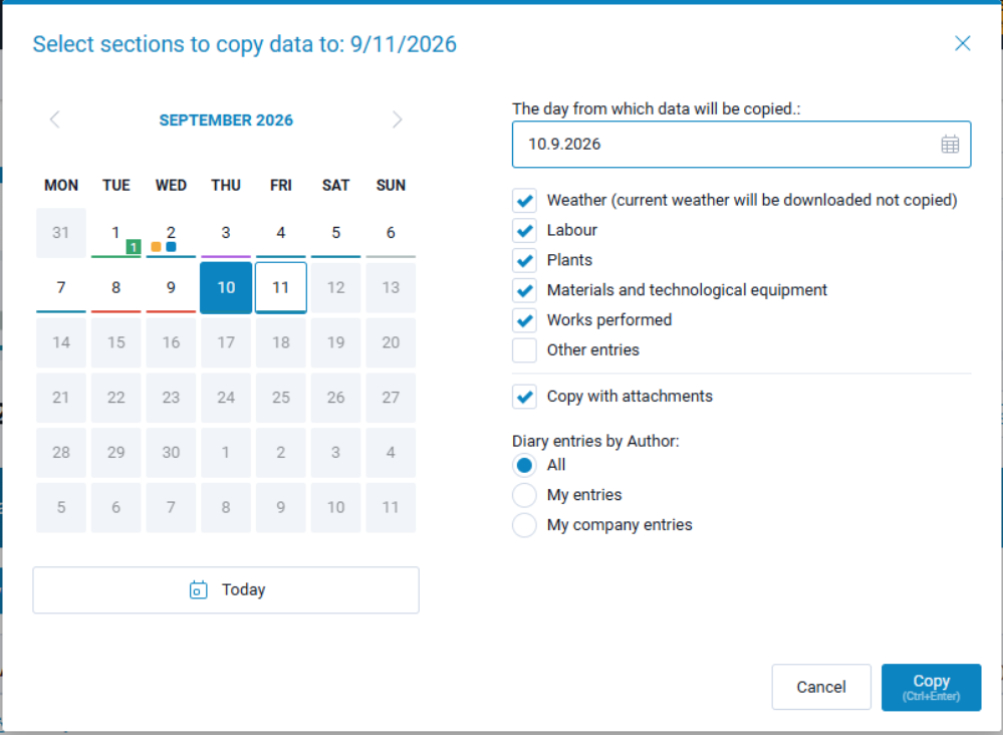
A copying window opens where you can select the day from which you want to copy the data using the calendar. You can adjust which sections you want to copy, choose whether to copy the data with or without attachments, and finally select whose records should be copied in terms of authorship.
The Weather section is an exception. It is never copied and is instead loaded from the server for the selected day.